

The Pattern
In April 2026, Vercel disclosed a breach that followed an attack chain worth studying. Not because the techniques were novel, but because the pattern is universal and almost nobody is hunting for it.
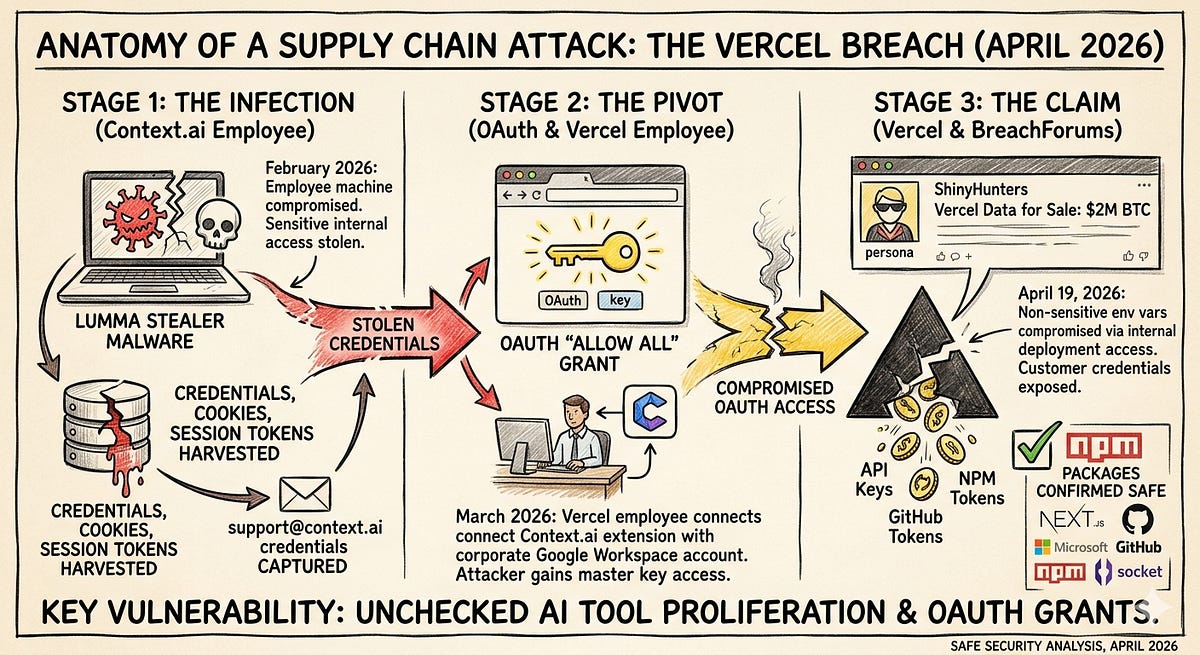
The short version: an infostealer infection on a third-party vendor’s employee machine harvested OAuth tokens. One of those tokens belonged to a trust relationship between the vendor’s application and a Vercel employee’s corporate Google Workspace account. The attacker inherited that access, pivoted into Vercel’s internal environments, and exfiltrated data. The attacker never phished the Vercel employee, bypassing their MFA, or touching their endpoint.
The breach wasn’t about Vercel specifically. It was about a pattern that exists in every organization: employees grant third-party applications OAuth access to corporate identity providers, creating persistent trust relationships that can be weaponized if the third party is compromised. The attacker doesn’t need to compromise you. They need to compromise anyone you trust.
This post breaks that pattern into four huntable behaviors. The Vercel/Context.ai incident is used as an illustrative case, but the hunts are designed to detect this pattern regardless of which vendor, which identity provider, or which attacker is involved.
Understanding the Attack Chain
The pattern decomposes into four phases. Each phase has distinct observable behaviors that can be hunted independently:
Phase 1 — Initial Compromise (Third-Party Endpoint)
An employee at a third-party vendor has their endpoint compromised by infostealer malware. The malware harvests credentials, session cookies, and OAuth tokens from the machine. In the Vercel case, this was Lumma Stealer delivered via a trojanized game cheat download on a Context.ai employee’s machine.
Phase 2 — Token Harvesting and Abuse
The stolen OAuth tokens include grants that the vendor’s application holds against your enterprise identity provider. These are legitimate tokens issued through a legitimate consent flow. The only thing illegitimate is who’s using them. In the Vercel case, Context.ai’s OAuth app had been granted Allow All permissions on a Vercel employee’s Google Workspace.
Phase 3 — Lateral Movement via Trust Relationship
The attacker uses the harvested tokens to authenticate as the trusted third-party application and access your environment. From your identity provider’s perspective, this looks like a normal API call from an authorized application. In the Vercel case, the attacker used Context.ai’s token to access the employee’s Google Workspace, then pivoted into Vercel’s platform environments.
Phase 4 — Objective Completion
With access to your environment through the trusted application, the attacker pursues their objective: data exfiltration, secrets harvesting, persistence establishment. In the Vercel case, the attacker enumerated and decrypted environment variables.
Each phase maps to a hunt below.
Hunt 1: Uncontrolled Third-Party OAuth Grants
Behavior you’re hunting: Employees granting OAuth consent to third-party applications (especially AI and productivity tools) that hold persistent, over-permissioned access to your identity provider.
Why this matters: This is the precondition that makes the entire attack chain possible. Without an existing OAuth trust relationship, a compromised third party can’t pivot into your environment. Every unmanaged OAuth grant is a lateral movement path waiting to be activated.
What to Look For
The specific indicators are consistent regardless of which identity provider you’re running:
Over-permissioned scopes: Applications with broad access like full Drive/OneDrive read-write, full Mail access, directory administration, or blanket
Allow Allgrants. Any scope that gives the application access beyond what its stated function requires.Shadow applications: Apps that aren’t on your approved SaaS inventory. Single-user signups are the highest risk. One employee tried a tool, clicked through a consent screen, and created a trust relationship your security team doesn’t know about.
AI and productivity tools: The explosion of AI-powered SaaS means employees are self-provisioning tools at a rate that outpaces any approval process. These tools typically request broad data access (Drive, email, calendar) to function, creating exactly the kind of over-permissioned grants this pattern exploits.
Stale grants: Applications the employee no longer uses but the OAuth grant persists. The vendor may have been acquired, shut down, or deprioritized security, but the token is still live.
Google Workspace
Navigate to Admin Console → Security → API Controls → Third-party app access. This shows every third-party application with OAuth access across your domain, the scopes granted, and which users consented.
For audit log hunting, filter OAuth Token events for authorize actions:
Event: authorize
Scope contains: drive OR gmail OR admin.directory OR calendar
Time: Last 180 days
Prioritize any grant where the scope includes broad permissions and the application isn’t in your approved inventory.
Microsoft Entra ID
Navigate to Entra Admin Center → Enterprise Applications → All Applications. Review permissions granted, focusing on:
Applications with delegated permissions consented by individual users (not admin-granted)
Directory.ReadWrite.All,Mail.ReadWrite,Files.ReadWrite.All, orUser.ReadWrite.AllscopesService principals with owners who are standard users. This is the service principal ownership abuse vector where compromising a regular user gives the attacker the ability to add credentials to a privileged app registration
AuditLogs
| where OperationName == "Consent to application"
| extend AppName = tostring(TargetResources[0].displayName)
| extend Scopes = tostring(TargetResources[0].modifiedProperties[0].newValue)
| extend User = tostring(InitiatedBy.user.userPrincipalName)
| where Scopes has_any ("Directory.ReadWrite", "Mail.ReadWrite", "Files.ReadWrite")
| project TimeGenerated, User, AppName, Scopes
| sort by TimeGenerated desc
The Deliverable
A complete inventory of third-party OAuth grants with: application name and client ID, scopes granted, consenting users, whether the application is on your approved SaaS inventory, and a risk assessment. Any application that is (a) not approved and (b) holds broad permissions should be reviewed for immediate revocation.
Vercel Case Reference
The specific indicators from the Vercel breach to check for in your environment:
OAuth Client ID (app):        110671459871-30f1spbu0hptbs60cb4vsmv79i7bbvqj.apps.googleusercontent.com
OAuth Client ID (extension):  110671459871-f3cq3okebd3jcg1lllmroqejdbka8cqq.apps.googleusercontent.com
Chrome Extension ID:          omddlmnhcofjbnbflmjginpjjblphbgk
Check for these specifically, but the hunt is about finding all uncontrolled grants. These are just today’s IOCs.

Hunt 2: Infostealer Exposure in Your Trust Chain
Behavior you’re hunting: Evidence that credentials, tokens, or session data from your employees, or from employees at vendors who hold OAuth grants against your environment, have been harvested by infostealer malware.
Why this matters: Infostealers are the initial access vector that feeds this entire pattern. But here’s the uncomfortable part: the Vercel breach didn’t start because a Vercel employee got hit. It started because a vendor’s employee got hit. You can run flawless endpoint hygiene internally and still be exposed through a third party’s compromised machine.
This hunt has two prongs: checking your own exposure and assessing your trust chain.
Your Own Exposure
Threat intelligence feed checks: Several services aggregate infostealer logs and index them by corporate domain.
Hudson Rock (hudsonrock.com): large infostealer log database, searchable by domain. They first attributed the Context.ai compromise to Lumma Stealer.
Flare (flare.io): dark web and infostealer market monitoring.
SpyCloud (spycloud.com): specializes in infostealer-derived credential exposure.
Have I Been Pwned (haveibeenpwned.com): more breach-focused than infostealer-focused, but a baseline check.
Query for your corporate domain(s). Any hits should be treated as active compromise indicators, not historical data points. If an employee’s tokens appear in an infostealer log, assume the tokens are in adversary hands until proven otherwise.

Endpoint behavioral hunting (if you have EDR):
Key file paths to monitor for unauthorized access:
# Browser credential stores (Chrome/Edge)
%LOCALAPPDATA%\Google\Chrome\User Data\Default\Login Data
%LOCALAPPDATA%\Google\Chrome\User Data\Default\Cookies
%LOCALAPPDATA%\Google\Chrome\User Data\Default\Web Data
%LOCALAPPDATA%\Microsoft\Edge\User Data\Default\Login Data

# Token caches
~/.config/gcloud/credentials.db
~/.config/gcloud/access_tokens.db
~/.aws/credentials
~/.azure/msal_token_cache.json
Hunt for:
Processes accessing these files that aren’t the browser itself or an approved password manager
Processes reading from multiple browser profile directories in sequence (the signature “harvest everything” behavior of infostealers)
Outbound connections shortly after credential store access, especially to unfamiliar infrastructure
Your Trust Chain Exposure
This is harder and less comfortable. The vendors who hold OAuth grants against your identity provider have employees with endpoints. Those endpoints can be compromised. When they are, the tokens those vendors hold for your environment may be in the exfiltrated data.
What you can do:
Cross-reference your OAuth grant inventory (from Hunt 1) with infostealer exposure feeds. If a vendor’s domain appears in Hudson Rock or similar, and that vendor holds OAuth grants against your IdP, that’s a high-priority risk.
For critical vendors (those with broad OAuth scopes), ask directly about their endpoint security posture and infostealer monitoring during your next vendor security review.
Monitor for public disclosure of vendor compromises. The window between a vendor’s compromise and their disclosure is exactly when you’re most exposed.
The Uncomfortable Truth
There’s a gap in this hunt that’s worth acknowledging: you can check if your employees are compromised, and you can reactively learn about vendor compromises through intelligence feeds or disclosure. But you can’t continuously monitor whether every vendor employee with access to tokens that touch your environment has a clean endpoint. This is a structural limitation of the OAuth trust model, and it’s why Hunt 1 (reducing the attack surface by controlling OAuth grants) is ultimately more impactful than Hunt 2 (detecting after the fact).
Hunt 3: Anomalous Third-Party Application Behavior
Behavior you’re hunting: OAuth-authenticated API access from a trusted third-party application that deviates from the application’s established behavioral baseline, indicating that someone other than the vendor is driving the API calls.
Why this matters: When an attacker uses a stolen OAuth token, the access appears to come from the legitimate application. Your IdP logs will show the app’s client ID making authorized API calls within its granted scopes. The access is technically legitimate. The only detectable anomaly is in how the token is being used: the behavioral pattern, not the authentication event.
Behavioral Indicators
These indicators apply regardless of identity provider or which third-party application is involved:
Geographic anomalies: An OAuth app that normally makes API calls from a cloud provider’s IP range (the vendor’s infrastructure) suddenly making calls from a different geographic region, a residential ISP, a VPN provider, or a hosting provider not associated with the vendor. This is the strongest signal. It means someone other than the vendor is using the token.
Temporal anomalies: API access outside the application’s normal operating pattern. A productivity tool that typically makes requests during business hours suddenly making calls at 3 AM. A synchronization service that normally runs on a schedule suddenly making ad-hoc requests.
Volume anomalies: A sudden spike in API calls. An app that normally makes a handful of requests per day suddenly enumerating entire Drive contents or pulling large volumes of email. The “smash and grab” pattern is distinctive: rapid, sequential access to resources the application previously accessed infrequently or not at all.
Access pattern changes: An application accessing resources or API endpoints it has scopes for but hasn’t historically used. The OAuth grant may allow broad access, but the legitimate application’s normal behavior only touches a subset. An attacker with the same token will use it differently.
Google Workspace
Use the Workspace audit logs to profile OAuth application behavior. The key log sources are Drive log events, Gmail log events, and OAuth Token log events under Admin Console → Reporting → Audit and Investigation.
Look for:
Drive Audit Log:
Event: view OR download
Actor: [OAuth app client ID]
Volume: > 50 events in 1 hour (adjust based on baseline)
And via the Reports API:
GET https://admin.googleapis.com/admin/reports/v1/activity/users/all/applications/token
Filter for token activity events associated with applications identified as high-risk in Hunt 1. Correlate IP addresses against the vendor’s known infrastructure ranges.
Microsoft Entra ID
Service principal sign-in logs are the primary data source:
AADServicePrincipalSignInLogs
| where TimeGenerated > ago(30d)
| extend AppName = tostring(ServicePrincipalName)
| summarize
    DistinctIPs = dcount(IPAddress),
    IPs = make_set(IPAddress),
    Locations = make_set(LocationDetails.city),
    CallCount = count()
    by AppName, AppId
| where DistinctIPs > 3
| sort by DistinctIPs desc
This surfaces service principals authenticating from an unusual number of distinct IPs, a potential indicator of credential misuse. Also hunt for new credentials being added to service principals, which is a persistence technique:
AuditLogs
| where OperationName has "Add service principal credentials"
| extend AppName = tostring(TargetResources[0].displayName)
| extend Actor = tostring(InitiatedBy.user.userPrincipalName)
| project TimeGenerated, Actor, AppName, OperationName
Building a Baseline
This hunt is only as good as your behavioral baseline. If you don’t know what normal looks like for an OAuth application, you can’t detect abnormal. Start by profiling the high-risk applications from Hunt 1:
What IP ranges do they normally authenticate from?
What times of day do they make API calls?
What resources do they typically access?
What’s their normal API call volume?
Document the baseline. Then alert on deviation. This doesn’t have to be sophisticated. Even a weekly manual review of OAuth app activity for your top-risk applications is better than nothing.
Hunt 4: Trust Boundary Lateral Movement
Behavior you’re hunting: Compromise of an identity provider account (via OAuth token abuse or any other means) being leveraged to access downstream platforms: CI/CD systems, cloud infrastructure, code repositories, PaaS environments, secrets managers.
Why this matters: Owning a Workspace or M365 identity is rarely the objective. It’s a waypoint. The attacker wants what that identity can reach. In modern environments, a single identity is often federated across dozens of platforms via SSO, linked credentials, and stored secrets. In the Vercel case, Workspace access led to platform environment access and secrets exfiltration. In your environment, the blast radius may be different, but the movement pattern is the same.
Map the Blast Radius First
Before you can hunt for this movement, you need to understand what’s reachable from a compromised identity. For each user with high-risk third-party OAuth grants:
SSO-connected applications: What can this identity access via Google/Microsoft SSO? Each is a pivot target if that identity is compromised. Most organizations underestimate how many platforms are SSO-connected.
Stored secrets in email and cloud storage: API keys, connection strings, passwords, tokens sitting in email threads, shared Drive folders, or OneNote notebooks. Attackers search for these immediately upon gaining email/Drive access.
CI/CD and PaaS integrations: Does this user have access to deployment platforms, build systems, or cloud consoles? Are there environment variables or secrets in those platforms stored in plaintext or not marked as
sensitive?Browser-synced credentials: If the user syncs their browser profile with their corporate identity, a Workspace/M365 compromise may expose their entire browser password store.
Detection Queries
SSO session correlation:
Look for SSO-initiated sessions in downstream platforms that correlate temporally with suspicious activity in your identity provider:
SignInLogs (downstream platform):
Authentication method: SSO
User: [users with high-risk OAuth grants]
Correlate with: unusual OAuth app activity from Hunt 3
The specific log sources depend on your platform stack, but the logic is consistent: if you see anomalous OAuth token usage in your IdP, check whether the affected identity subsequently created sessions in connected platforms.
Secrets and environment variable access:
GitHub:   org.update_actions_secret, repo.update_actions_secret
AWS:      CloudTrail GetSecretValue, GetParameter (SSM)
GCP:      Secret Manager AccessSecretVersion
Azure:    Key Vault SecretGet
PaaS:     Environment variable access events (check audit logs)
On Vercel, Netlify, and similar platforms, pay special attention to variables not configured as sensitive or encrypted, which may be readable to any authenticated user with project access.
Email and cloud storage enumeration:
The rapid-fire pattern of an attacker enumerating everything they can reach through a compromised identity:
Drive/OneDrive: high-volume
view,download, orcopyevents in a short window, especially against files the user doesn’t typically accessEmail: API-based access to mailbox contents (as opposed to normal interactive use), particularly bulk read patterns
Across both: access from the same anomalous IP/geo identified in Hunt 3
Hardening Against the Pattern
Hunting finds current exposure. Hardening reduces future attack surface. These recommendations map to the four phases of the attack chain:
Reduce the trust surface (Phase 2 prevention):
Implement an OAuth app allowlist in your identity provider. Block user consent for unapproved applications.
Restrict broad scopes by default. No third-party app gets
Allow Allor equivalent without explicit security review.Alert on new OAuth consent events, especially for high-privilege scopes.
Conduct quarterly reviews of active OAuth grants and revoke stale or unnecessary ones.
Establish a lightweight process for employees to request approval for new SaaS tools rather than self-provisioning with corporate credentials.
Limit the blast radius (Phase 3/4 prevention):
Default all secrets, environment variables, and API keys to encrypted/sensitive storage in every platform. The Vercel breach specifically exploited variables that weren’t marked sensitive.
Audit CI/CD and PaaS platforms for secrets stored in plaintext.
Enforce short-lived access tokens (5-15 minutes) with appropriately scoped refresh tokens where your IdP supports it.
Implement token binding or sender-constrained tokens to make stolen tokens unusable from unauthorized devices.
Segment SSO access. Not every identity needs access to every connected platform.
Build resilience (detection and response):
Monitor infostealer exposure feeds for your corporate domains and critical vendor domains.
Baseline OAuth application behavior and alert on deviation.
Rotate tokens and secrets immediately upon any suspected identity compromise, including when a vendor discloses a compromise.
Maintain a runbook for “third-party vendor compromise” that includes identifying all OAuth grants from that vendor, revoking them, auditing access logs for the affected period, and rotating any secrets the affected identities could reach.
Vercel/Context.ai IOCs
For immediate operational use. These are specific to the April 2026 Vercel incident and should be checked alongside the broader hunts above:
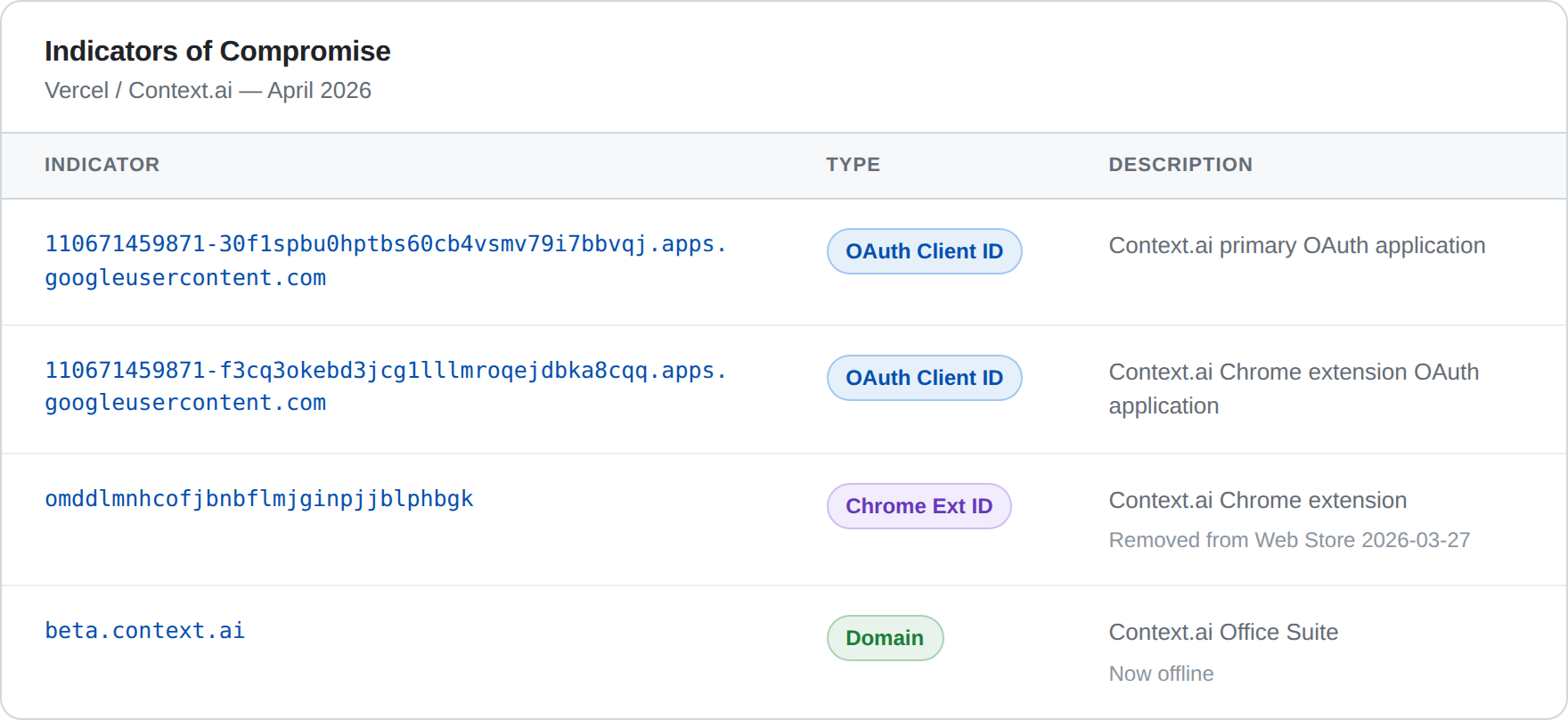
and because I spent too many years hand keying IOCs from photos and PDFs:110671459871-30f1spbu0hptbs60cb4vsmv79i7bbvqj.apps.googleusercontent.com
110671459871-f3cq3okebd3jcg1lllmroqejdbka8cqq.apps.googleusercontent.com
omddlmnhcofjbnbflmjginpjjblphbgk
beta.context.ai
The Bigger Picture
The Vercel/Context.ai breach is a clean example of a pattern that’s been building for years: as organizations adopt more SaaS tools, they create more trust relationships, and each trust relationship is a lateral movement path that bypasses traditional perimeter and endpoint controls. The attacker doesn’t need to beat your security. They need to beat the security of anyone you’ve granted trust to.
That’s not a problem you solve once. It’s a behavior you hunt for continuously.
Happy thrunting!
The THOR Collective is a practitioner-driven cybersecurity collective focused on detection, hunting, and response tradecraft. Want to contribute? Reach out.