

I hope you enjoyed the last post about CZDS, but I wanted to write another one explicitly related to my experience and how you can profile a domain address.
All of this derived from a tool I wrote called domain-profiler (and the other blog gave me an itch).
So here we go, let’s talk about how you can approach profiling a domain.
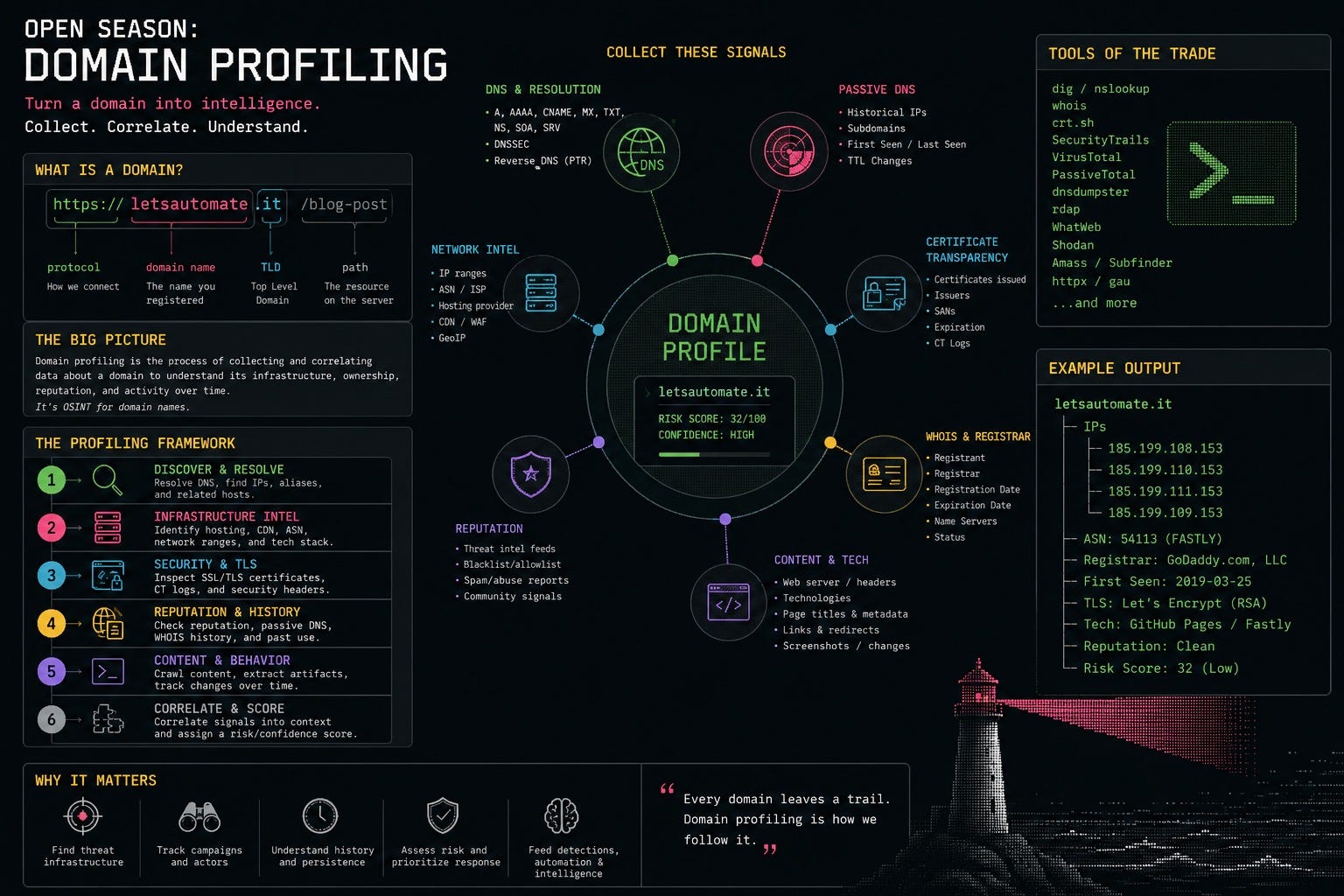
What Is a Domain?
To start, let’s just set an example. I’ll use my blog letsautomate.it in this post since it is the most apt to this situation.
Let’s first break down what a domain looks like using a full (typical) URL:
https://letsautomate.it/blog-post
        |-------------|
            domain
If we break this down even further, we have:
The protocol:
https://The registered name:
letsautomateThe country-code top-level domain (ccTLD):
.itThe path/resource:
/blog-post(not part of the domain)
That is a simple explanation that works for most domains, but things get trickier with multi-level TLDs like co.uk. Different portions of domains are governed by different countries, organizations, and policies.
Obviously the most popular one is .com, but there are now thousands of TLD types that can be used. Some are cheap, some are expensive, and some just look cool.
How Do Domains Work?
When you visit a site, you enter a friendly name like letsautomate.it. Under the hood, your browser sends a request to a local recursive resolver (typically your ISP or configured DNS service).
If that resolver already has the answer cached, it returns immediately. If it does not, it starts a recursive lookup process:
Query a root nameserver.
Receive a referral to the
.itTLD nameservers.Query the
.itnameserver.Follow referrals until it finds the authoritative nameserver for
letsautomate.it.Query the authoritative nameserver for the desired record (often
AorAAAA).
For letsautomate.it, the A records are:
{
  "A": [
    "185.199.111.153",
    "185.199.108.153",
    "185.199.109.153",
    "185.199.110.153"
  ]
}
Those IPs are GitHub Pages addresses. I registered the domain through GoDaddy, used GoDaddy nameservers, and pointed the A records to GitHub.
Once that was done, I updated GitHub Pages by adding a CNAME file with letsautomate.it, and GitHub handled the rest.
Domain DNS
When I registered letsautomate.it, I used GoDaddy as the registrar and also used GoDaddy’s nameservers to host DNS records.
Technically, I did not purchase the domain permanently. I registered the right to use it for a period, subject to renewal and the policies governing the .it TLD.
There are a few organizations and roles involved:
The registry (Registro.it) operates the
.itTLD and maintains the authoritative registration database.The registrar (GoDaddy) provides the interface where I registered and manage the domain.
The DNS provider hosts authoritative nameservers and DNS records. In this case, also GoDaddy.
The registrant is the person or organization that registered the domain (me).
Registrars act as approved intermediaries between registrants and registries. They handle registration, renewal, billing, account security, and delegation changes.
Because GoDaddy is also hosting DNS, I can manage records like A, AAAA, CNAME, MX, and TXT in one place.
Delegation flow looks like this:
letsautomate.it
  -> .it registry delegates to configured nameservers
  -> GoDaddy authoritative nameservers answer
  -> A records point to GitHub Pages
I could move DNS to Cloudflare or self-hosted nameservers by changing delegation at GoDaddy.
On a private network, you can even use internal names such as blog.josh.internal:
Your computer
  -> Your private resolver
  -> Your private nameserver
  -> Your server
A very local version of name resolution is also your hosts file:
192.0.2.50 letsautomate.it
On the internet, that same concept happens with a lot more moving parts.
DNS Records
There are many DNS record types, each with a different purpose.
Common records include:
A: maps a hostname to an IPv4 address (RFC 1035).AAAA: maps a hostname to an IPv6 address (RFC 3596).CNAME: aliases one hostname to another (RFC 1035).MX: identifies inbound mail servers (RFC 1035).TXT: publishes arbitrary text (SPF, DKIM, DMARC, verification, etc.).NS: identifies authoritative nameservers (RFC 1035).SOA: zone administrative/synchronization metadata (RFC 1035).SRV: service host and port metadata (RFC 2782).CAA: specifies which certificate authorities may issue certs (RFC 8659).PTR: reverse DNS mapping from IP to hostname (RFC 1035).
For letsautomate.it, A records direct web traffic to GitHub Pages. Other records can independently route email, publish anti-spoofing policy, verify domain ownership, or restrict certificate issuance.
This separation means a single domain can use multiple providers simultaneously:
Website on GitHub Pages
Email at Google
DNS at Cloudflare
Registration at GoDaddy
Domain Security
Domain security is not a single yes/no property.
A domain can have a valid TLS certificate while still having weak DNS controls, suspicious registration characteristics, or dangling records that could be claimed by someone else.
No individual signal proves a domain is safe or malicious. The value comes from combining many weak-to-moderate signals into a coherent profile.
DNSSEC
Standard DNS shows where a domain points, but not whether responses were modified in transit. DNS Security Extensions (DNSSEC) add cryptographic signatures.
A signed zone publishes DNSKEY records, and the parent publishes a DS record that links trust to the hierarchy.
Finding a DNSKEY record alone is not enough to claim DNSSEC works.
I have a Python package called domain-profiler that performs DNSSEC, CAA, RDAP, TLS, and more.
domain-profiler checks:
Whether the zone publishes DNSSEC keys
Whether
DNSKEYRRsets are validly signedWhether the parent
DSmatches zone keysWhether a validating resolver sets the AD flag
Whether weak/deprecated signing algorithms are in use
It classifies results as:
secure: signatures and chain of trust validateinsecure: no complete DNSSEC chainbogus: DNSSEC exists, but signatures/delegation fail validationerror: validation could not be completed
Example output shape:
{
  "dnssec": {
    "status": "secure",
    "has_dnskey": true,
    "ds_matches": true,
    "ad_flag": true,
    "algorithm_warnings": []
  }
}
An unsigned domain is still extremely common and is not inherently malicious. A bogus result is often more interesting because it may indicate breakage or tampering.
CAA
A Certification Authority Authorization (CAA) record tells certificate authorities which organizations can issue TLS certificates for a domain.
Common tags:
issue: controls normal certificate issuanceissuewild: controls wildcard issuanceiodef: reporting destination for policy violations
Example:
letsautomate.it. 3600 IN CAA 0 issue "letsencrypt.org"
letsautomate.it. 3600 IN CAA 0 issuewild ";"
If no CAA policy exists, any publicly trusted CA may issue a cert after its normal validation process. That is not automatically vulnerable, but it does mean issuance is unrestricted.
CAA can be inherited. If no record is found on the exact hostname, CAs can walk up the DNS hierarchy to find applicable policy. The profiler follows this logic and reports where effective policy came from.
The tool identifies:
Authorized certificate authorities
Wildcard-specific policy differences
Explicit issuance denial
Incident-reporting destination availability
Cases where effective policy cannot be determined
CAA is not a complete defense, but it is useful control over who should be issuing certs for your domain.
RDAP and WHOIS
WHOIS has traditionally been used to retrieve registration data, but output formats are inconsistent and difficult to parse reliably.
RDAP (Registration Data Access Protocol) is the structured successor to WHOIS and provides standardized JSON responses.
This is useful when investigating suspicious domains. Very recent registration, changes just before activity, or unexpected nameserver shifts may warrant additional scrutiny.
Status codes are useful too. For example, clientTransferProhibited often indicates registrar transfer lock protections.
Registration age alone is only a supporting signal. Legitimate organizations register new domains daily, and attackers can compromise old domains. RDAP becomes more useful when correlated with DNS, certificates, hosting data, and observed behavior.
TLS
TLS is the protocol behind https://. During the handshake, the server presents a certificate with identity and crypto configuration details.
A newly issued certificate is not automatically suspicious. Many modern services rotate certificates frequently, and authorities like Let’s Encrypt issue short-lived certs at huge scale.
But a look-alike domain that was just registered and got a same-day certificate is much more interesting than either signal by itself. This is where profiling pays off: weak individual signals become stronger when combined.
Email Authentication
Domains also publish records that define who may send email for them.
The profiler can inspect:
SPF records and nested include relationships
DKIM public keys for common selectors
DMARC policy, alignment, and reporting
BIMI logo and authority records
MX records and recognizable providers
Example SPF record with multiple providers:
v=spf1 include:_spf.google.com include:mailgun.org include:spf.protection.outlook.com -all
SPF can become complex quickly because one record can reference multiple external providers. domain-profiler can produce both a tree and flattened list of resulting IPs/networks, and track SPF’s ten-lookup limit.
DKIM is harder to enumerate because selectors are sender-chosen and there is no universal selector directory. The profiler checks common selectors and allows custom selector input.
These records help evaluate both email-security posture and authorized sender infrastructure.
Typosquatting and Homoglyphs
When investigating phishing, you may compare a candidate domain to a known brand.
The profiler compares registrable portions using edit-distance similarity, decodes internationalized domain names (IDN), and normalizes common visual substitutions, including:
0foro1for lowercaselCyrillic letters that resemble Latin letters
Greek letters that resemble Latin letters
Multi-character combinations such as
rnappearing similar tom
Example comparison:
paypal.com
xn--pypal-4ve.com
A domain can appear visually similar to paypal.com while containing technically different characters.
The tool reports:
Raw similarity
Similarity after homoglyph normalization
Whether Punycode was used
Whether multiple writing systems are mixed
Similarity alone is not proof of malicious intent. It becomes powerful when combined with other signals such as recent registration, fresh cert issuance, unfamiliar infrastructure, and brand-mimicking content.
Putting It All Together
A domain is more than a name pointing to a website. It is a set of registrations, delegations, infrastructure references, security policies, and cryptographic assertions across several systems.
Each data source answers a different question:
DNS: where services are located
RDAP: registration/admin context
TLS: HTTPS identity and certificate metadata
CAA: allowed certificate authorities
DNSSEC: DNS integrity/validation
SPF, DKIM, DMARC: email authorization/protection
Typosquatting analysis: similarity to known brands
CNAME/wildcard analysis: potential takeover exposure
None of these are especially strong in isolation.
New cert: normal
New domain: normal
GitHub Pages hosting: normal
Name similarity: sometimes normal
Interesting patterns emerge when these overlap.
A domain registered yesterday, similar to a known company, using unfamiliar nameservers, with a certificate issued hours ago, and hosting a cloned login page is a far stronger signal than any single indicator.
This process is useful defensively too. Looking at letsautomate.it showed me how the domain is delegated, where hosting lives, which CA GitHub Pages uses, and which controls were configured or missing.
It also led me to add CAA restrictions:
letsautomate.it. 3600 IN CAA 0 issue "letsencrypt.org"
letsautomate.it. 3600 IN CAA 0 issuewild ";"
That is really the point of domain profiling: not just labeling domains as “good” or “bad,” but collecting enough context to understand what a domain is, how it works, what changed, and whether its pieces make sense together.
Conclusion
The internet exposes a surprising amount of domain metadata. DNS records, registration data, certificates, email policies, and infrastructure relationships are observable without direct access to backend systems.
For more context, check out:
The hard part is not collecting one record. The hard part is connecting records into a useful profile.
That is why I built domain-profiler: to gather these observations, interpret security relevance, and return output that is useful for investigation, enrichment, or simply better understanding your own domains.
As always, understanding the nuances of this core technology helps us investigate and defend more effectively.

Strong work Josh! Great resource.
Great breakdown of domain profiling. Really appreciate it.
One thing I'd add for folks building tools like domain-profiler at scale: WHOIS output really is inconsistent across registrars and regions, as you noted. If you're automating WHOIS enrichment for multiple domains, parsing raw WHOIS responses reliably is surprisingly annoying.
WhoisFreaks.com normalizes that into JSON, so if you're doing bulk domain profiling or enriching existing logs, it cuts down parse complexity. Worth checking out if you're hitting rate limits or parse errors with raw WHOIS lookups.